What are the Storefront Info Notes?
Info notes let you share helpful information with your buyers while they browse and check out. There are two kinds, and both are managed from the Info Notes tab when you edit a storefront.
Storefront Notes
A free-form list of notes that appears as a bulleted info section at the bottom of your main store page, below your products and categories.
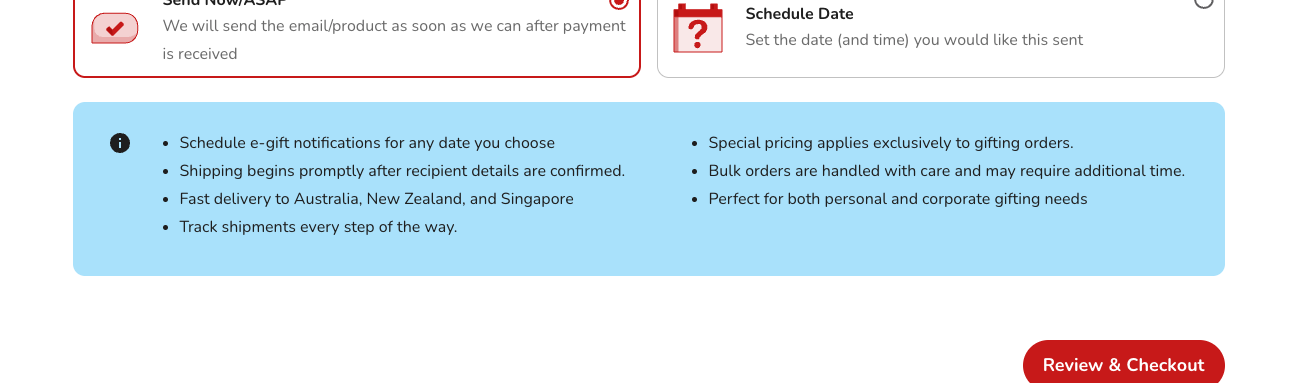
You can add as many notes as you need, edit or remove them, and drag them into the order you want. Each change saves on its own.
Checkout Notes
A fixed set of optional notes that guide buyers through the checkout and the "Delivery and Gift Settings" page. Each one has its own on/off switch and is off by default. When switched on, it shows as a grey info box in the matching spot at checkout.
To see exactly where each one appears, see Display locations of your storefront info notes.
Notes are set per storefront
Info notes belong to a single storefront. If you have more than one storefront, open each one and set up its notes separately.
How to manage your notes
- How to add new Storefront Info Notes?
- How to update your Storefront Info Notes?
- How to delete your Storefront Info Notes?
- How to reorder your Storefront Info Notes?
Examples
Some example notes you could use:
- Schedule e-gift notifications for any date you choose.
- Shipping begins promptly after recipient details are confirmed.
- Fast delivery to Australia, New Zealand, and Singapore.
- Track shipments every step of the way.
- Special pricing applies exclusively to gifting orders.
- Bulk orders are handled with care and may require additional time.
- Perfect for both personal and corporate gifting needs.
These are just a few examples. Use them or write your own.