Completing the Branding step
Before completing this step, here are the details you will need to prepare:
- Name for your vendor account
- Logo for your branding (Logo will be placed on a white background so if using a png keep this in mind)
- Primary branding colour (can use our colour picker or hex code)
This step looks like the following:
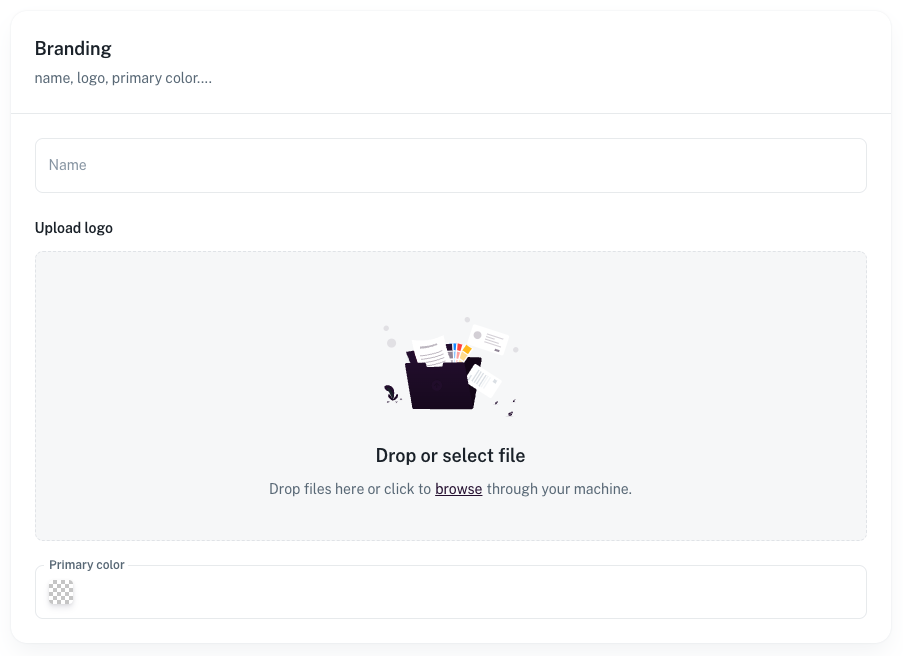
The name is your vendor name, the name that will appear to your customers in emails, order conformations etc.
The logo is your company logo, this can be uploaded in png or jpg format.
When uploading, make sure you are using a high enough quality version of your logo.
We recommend the size be at least 500px either width or height depending on your logo shape.
Also be aware that the logo will be sitting on a white background so using a white logo isn't recommended.
Lastly the primary colour is the main colour associated with your account.
Our recommendation would be to use a colour from your logo.
For example if this was your logo:

Our recommendation would be to use a colour from your logo.
For example if this was your logo:
Then the colour selected would be the "red" in the icon
This can be entered using the colour picker or entering the hex code
Related Articles
Completing the Storefront step
Before completing this step, here are the details you will need to prepare: Store name Logo (Logo will be placed on a white background so if using a png keep this in mind) Primary branding colour (can use our colour picker or hex code) Secondary ...Completing the Product step
If you have set up an integration with Trove then you can skip this step. Otherwise you can upload a CSV of your products using our product import. The format of this file needs to be in a CSV format The actual content of the file can vary as you can ...How the setup wizard works
The setup wizard helps you hit the ground running. It will guide you through setting up your vendor details with branding, storefront details with branding, connection to your shopify or similar service, your subscription and your payout details. The ...Completing the Integration step
-Completing the Banking and Payment step
-